Sunday, April 19, 2026

Pre installed application in Linux Mint

 What Is Linux Mint, and Why Would You Use It?


In my previous post the step by step guidelines for installation of Linux Mint was given. In this post the various preinstalled applications which come with Linux Mint are discussed. 

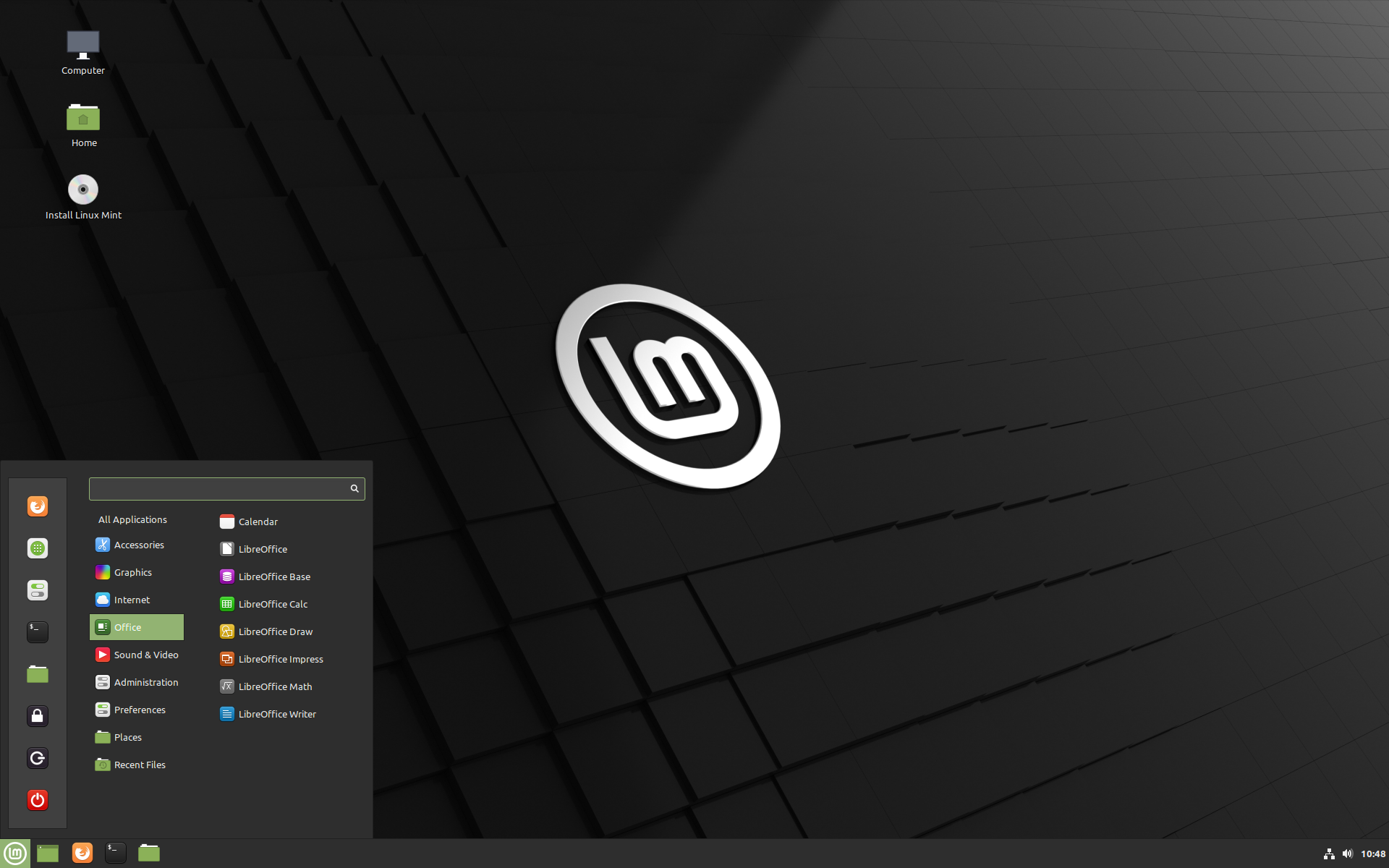
Linux Mint comes with a well-thought-out set of preinstalled applications so that you can start working immediately without needing to install basic tools. Here’s a clear overview of the most useful ones you’ll find:

πŸ“ File Management

  • Nemo (File Manager)
    Simple and powerful tool to browse, copy, move, and organize files—very similar to Windows File Explorer.

🌐 Internet & Browsing

  • Firefox (Web Browser)
    Preinstalled for fast and secure web browsing.
    (You can install Google Chrome if you prefer.)

πŸ“ Office & Productivity

  • LibreOffice Suite
    A complete office package comparable to Microsoft Office:
    • Writer (Word alternative)
    • Calc (Excel alternative)
    • Impress (PowerPoint alternative)

πŸ“§ Email

  • Thunderbird (Email Client)
    Manage multiple email accounts in one place with a desktop app.

🎡 Multimedia

  • Celluloid (Video Player)
    Plays most video formats smoothly.
  • Rhythmbox (Music Player)
    Organize and play your music library.

πŸ“· Image Viewing & Editing

  • Image Viewer (Xviewer)
    Quick and lightweight image viewer.
  • Drawing Tool
    Basic image editing (similar to MS Paint).

πŸ“¦ Software Installation

  • Software Manager
    Easy graphical tool to install thousands of applications safely.
  • Synaptic Package Manager
    Advanced tool for managing software packages (for experienced users).

πŸ› ️ System Tools

  • Update Manager
    Keeps your system secure and up to date.
  • Timeshift
    Creates system snapshots so you can restore your system if something goes wrong.
  • Disk Usage Analyzer
    Helps you identify which files are using the most space.

πŸ’» Utilities

  • Terminal
    Command-line interface for advanced operations.
  • Text Editor (Xed)
    Simple tool for editing text files.
  • Archive Manager
    Extract and compress ZIP, RAR, and other archive formats.

πŸ” Security & Administration

  • Built-in firewall support (can be enabled easily)
  • User and password management tools

✨ Final Thought

One of the best things about Linux Mint is that it comes ready to use out of the box—no need to install basic software like in Windows 11.

As you continue exploring, you’ll discover that you can add thousands of free applications through the Software Manager—safely and easily.


Saturday, April 18, 2026

Installation of Linux in Desktop/Laptop in the place of Windows operating system


Switching to Linux: A Complete Beginner’s Guide (From Windows to Linux—and Back Again)

  About Linux Mint - Linux Mint


After using various versions of Windows on my laptop over the years, I noticed a significant decline in performance after upgrading to Windows 11. The system frequently became slow and unresponsive, often hanging while I was working on documents or videos. Restarting the system became a routine necessity.

Faced with these challenges, I decided to explore an alternative—and that’s when I turned to Linux. With proper guidance, I successfully installed Linux Mint (Cinnamon Edition), and the experience has been refreshingly smooth.

If you are facing similar issues, this guide will help you understand why Linux is worth considering and how to make the transition step by step.


Why Choose Linux Over Windows?

1. Better Performance

Linux runs efficiently even on older systems with limited RAM and storage. Unlike Windows, it does not slow down over time due to background processes.

2. Free and Open Source

Most Linux distributions, including Ubuntu and Linux Mint, are completely free. You also receive regular updates without licensing costs.

3. Enhanced Security

Linux is far less vulnerable to viruses and malware. In most cases, antivirus software is not required.

4. Stability and Reliability

Linux systems are known for their stability. They rarely crash and can run for long durations without needing a restart.

5. High Customization

You can customize almost every aspect of Linux—from appearance to functionality—based on your preferences.

6. Software Availability

Essential applications such as browsers, office tools, and media players are readily available. You can also install Google Chrome easily.


Popular Linux Distributions for Beginners

If you are new to Linux, the following distributions are highly recommended:

  • Linux Mint (Best for Windows users)
  • Ubuntu
  • Zorin OS

Installing Linux Alongside Windows (Dual Boot Method)

Dual booting allows you to use both Linux and Windows on the same system.

Step 1: Download Linux

Visit the official Linux Mint website and download the ISO file (around 2–3 GB).

Step 2: Create a Bootable USB Drive

Use a tool like Rufus:

  • Insert a USB drive (minimum 8 GB)
  • Open Rufus
  • Select your USB device
  • Choose the downloaded ISO file
  • Click Start

Your bootable USB is now ready.


Step 3: Backup Important Data (Very Important ⚠️)

Before proceeding:

  • Backup files from C, D, E, and F drives
  • Use an external hard disk or pen drive

Step 4: Boot from USB

  • Restart your laptop
  • Press the boot key (HP laptops usually use ESC or F9)
  • Select the USB drive

Step 5: Try Linux Without Installing

Select “Try Linux Mint”

This allows you to:

  • Test performance
  • Check internet, sound, and display
  • Explore the interface

No changes are made to your system at this stage.


Step 6: Start Installation

Click “Install Linux Mint”


Step 7: Choose Installation Type

✅ Recommended (Safe Option)

Install Linux Mint alongside Windows

  • Keeps Windows intact
  • Adds Linux as a second OS

⚠️ Risky Option

Erase disk and install Linux

  • Deletes all data (C, D, E, F drives)

Step 8: Allocate Disk Space

If choosing dual boot:

  • Adjust the slider
    • Example:
      • Windows → 60%
      • Linux → 40%

Step 9: Complete Installation

  • Enter your name and password
  • Select time zone
  • Click Install

Wait for about 15–30 minutes.


Step 10: Restart the System

  • Remove the USB drive
  • Restart your system

You will now see a menu to choose between:

  • Linux Mint
  • Windows

Installing Linux by Replacing Windows

If you want to completely remove Windows:

  • Follow Steps 1–4 above
  • Choose “Erase disk and install Linux”
  • Continue installation

After completion, only Linux will remain on your system.


How to Remove Windows After Installing Linux (From Dual Boot)

If you later decide to keep only Linux:

  1. Boot into Linux
  2. Open a partition tool (like GParted)
  3. Delete Windows partitions (NTFS format)
  4. Expand the Linux partition
  5. Update bootloader using:
sudo update-grub

Windows will no longer appear in the boot menu.


How to Remove Linux and Keep Only Windows

To revert back to Windows:

  1. Boot into Windows
  2. Open Disk Management
  3. Delete Linux partitions (ext4 format)
  4. Open Command Prompt (Admin) and run:
bootrec /fixmbr
bootrec /fixboot
  1. Restart the system

Your system will now boot directly into Windows.


 Appearance of Linux OS screen in Laptop 

Common Issues and Useful Tips

  • If fonts appear too small in Linux:
    • Adjust Display Scaling in Settings
    • Modify font size separately if needed
  • Always take a full backup before partitioning
  • For beginners, Linux Mint offers the smoothest transition from Windows


 Final Thoughts

Linux is a powerful, secure, and efficient alternative to Windows—especially for users struggling with performance issues. The ability to dual boot makes it easy to explore Linux without fully giving up Windows.

Once you become familiar with it, you may find Linux not only faster but also more reliable and enjoyable for everyday use.


Saturday, March 28, 2026

TNEB Aadhaar Link: How to Link Aadhaar With TNEB & Check Link Status


How to Link Aadhaar with TNEB (TANGEDCO): Complete Guide

The Tamil Nadu Electricity Board (TNEB), a government-owned utility, is responsible for the generation and distribution of electricity across Tamil Nadu. In recent years, linking your Aadhaar card with your electricity connection has become mandatory for paying bills and maintaining an active connection.

By linking Aadhaar with your TNEB account, consumers can enjoy transparent billing, subsidies, and access to various government schemes.

In this article, you’ll find everything you need to know about the Tamil Nadu Generation and Distribution Corporation Limited (TANGEDCO) Aadhaar linking process, its purpose, benefits, and step-by-step instructions.


πŸ“Œ Important Note

After successfully linking your Aadhaar with TNEB, consumers are eligible to receive the first 100 units of electricity free (as per government policy).


Purpose of Linking Aadhaar with TNEB

The primary objective of linking Aadhaar with TNEB is to improve transparency and reduce misuse. It helps:

  • Prevent multiple electricity connections under a single identity
  • Eliminate fraudulent practices
  • Ensure fair usage and distribution of electricity

By connecting Aadhaar with electricity accounts, the government can better regulate consumption and deliver benefits to the right consumers.


Benefits of Linking Aadhaar with TNEB

Linking your Aadhaar card with your TNEB account offers several advantages:

1. Reduced Electricity Bills

Consumers using less than 500 units may experience a noticeable reduction in their electricity bills. In some cases, the bill amount may decrease significantly, easing the financial burden on households.

2. Improved Efficiency

Aadhaar linkage ensures accurate billing and better management of customer data. It allows consumers to:

  • Track electricity usage
  • Monitor meter readings
  • Access payment history easily

This leads to faster and more efficient service delivery.

3. Access to Subsidies

Consumers who link their Aadhaar with TNEB are eligible for government subsidies, including:

  • Free electricity for the first 100 units (subject to policy terms)

TNEB Subsidy Details

According to TANGEDCO, linking your Aadhaar number with your consumer number is mandatory to receive electricity subsidies.

  • Subsidies may be withheld if Aadhaar is not linked
  • Applicable to:
    • Domestic users
    • Agricultural users
    • Hut services
    • Handloom and powerloom sectors

Once the Aadhaar linking process is successfully completed, eligible consumers can avail of free electricity for the first 100 units.


How to Link Aadhaar with TNEB Online

Follow these steps to link your Aadhaar with your TNEB connection:

Step 1

Visit the official TANGEDCO website:
https://www.tnpdcl.org/en/tnpdcl/

Step 2

Click on “Online Services”.
Scroll down and select “Aadhaar – Link your service connection number” under Consumer Services.

Step 3

Enter the following details:

  • Service connection number
  • Mobile number
  • Captcha code

Click “Enter”.

If your Aadhaar is already linked, a message will appear stating:
“Owner Aadhaar number already linked.”

Step 4

Verify the connection holder’s name and select the appropriate option:

  • Owner
  • Tenant
  • Owner (name not updated)
  • Relative of an NRI

Step 5

Enter your Aadhaar number, provide consent, and click “Send OTP”.

Step 6

Enter the OTP received on your registered mobile number and click “Submit”.

Your Aadhaar will now be successfully linked to your TNEB connection.


How to Check TNEB Aadhaar Link Status

After linking your Aadhaar, you will receive an SMS confirmation. You can also check the status online:

Step 1

Visit the official TANGEDCO website.

Step 2

Click on “Online Services”, then select “Bill Status” under Payment and Billing Services.

Step 3

Enter your:

  • Service connection number
  • Mobile number

Click “Submit”.

Step 4

Your connection details will be displayed, including Aadhaar linking status.


Conclusion

Linking your Aadhaar with your TNEB account is an important step toward ensuring transparent billing, efficient service, and access to government subsidies. It not only benefits consumers but also helps maintain a reliable and fair electricity distribution system.

Make sure to complete the Aadhaar linking process to continue enjoying uninterrupted services and eligible benefits.


Source: ClearTax

Friday, March 27, 2026

Key Highlights of the New Income Tax Act, 2025 coming into effect from 1st April 2026


Income Tax Act, 2025: Key Changes and What They Mean for You

The Income Tax Act, 2025 will come into effect from 1 April 2026, introducing significant structural reforms, extended filing deadlines, revised TDS/TCS rates, and updated compliance rules. Notably, the existing tax slabs remain unchanged.


Key Highlights of the Income Tax Act, 2025

1. Implementation of the New Act

The Income Tax Act, 2025 replaces the Income Tax Act, 1961. The new law aims to simplify language, eliminate redundant provisions, and reduce litigation. It will be applicable from 1 April 2026 for FY 2026–27 (AY 2027–28).


2. Income Tax Slabs (No Change)

Under the new tax regime:

  • Up to ₹4 lakh: Nil
  • ₹4 lakh – ₹8 lakh: 5%
  • ₹8 lakh – ₹12 lakh: 10%
  • ₹12 lakh – ₹16 lakh: 15%
  • ₹16 lakh – ₹20 lakh: 20%
  • ₹20 lakh – ₹24 lakh: 25%
  • Above ₹24 lakh: 30%

Taxpayers can claim a rebate of up to ₹60,000 under Section 87A, making income up to ₹12 lakh effectively tax-free.


3. Standard Deduction

The standard deduction has been increased to ₹75,000 for salaried individuals under the new regime. This raises the zero-tax threshold to ₹12.75 lakh.


4. Filing Deadlines

  • ITR-1 & ITR-2: 31 July
  • Non-audit cases (ITR-3, ITR-4, ITR-5) & trusts: 31 August
  • Audit cases: 31 October

Revised returns can now be filed up to 12 months from the end of the relevant tax year, with a nominal fee if filed after 9 months.


5. TDS and TCS Changes

  • TCS on alcoholic liquor, scrap, and minerals increased to 2%
  • TCS on tendu leaves and LRS remittances for education/medical reduced to 2%
  • Overseas tour package remittance TCS simplified to a flat 2%
  • TDS compliance for property transactions involving non-residents has been simplified; PAN-based deduction is sufficient

6. Securities Transaction Tax (STT)

STT rates for derivatives have been increased:

  • Futures: 0.02% → 0.05%
  • Options (premium): 0.10% → 0.15%
  • Options (intrinsic value): 0.125% → 0.15%

7. Buyback Taxation

Income received from share buybacks will now be taxed as capital gains instead of deemed dividends. The effective tax rate for individual promoters is 30%.


8. Sovereign Gold Bonds (SGBs)

Capital gains exemption will apply only to bonds purchased during the initial issue. Gains from the secondary market will be taxable.


9. Deductions and Exemptions

  • Education allowance: ₹3,000/month per child
  • Hostel allowance: ₹9,000/month per child
  • Employer contribution to NPS under Section 80CCD(2) allowed
  • Agniveer corpus: Tax-free
  • Leave encashment limit increased to ₹30 lakh for non-government employees

10. Compliance Simplifications

  • Digital notices and AI-driven scrutiny
  • Unified penalty regime
  • Faceless assessments and auto-generated e-certificates
  • Relaxed foreign asset reporting for small-value assets

11. Updated Returns

Taxpayers can file updated returns up to 48 months, even after reassessment notices. Additional tax may apply, but no penalties will be levied.


12. Other Notable Changes

  • Interest on motor accident compensation is now fully tax-free
  • No TAN required for resident buyers purchasing property from non-residents
  • Easier process for obtaining lower or nil TDS certificates
  • Tax on unexplained income reduced from 60% to 30% if voluntarily disclosed

Impact on Taxpayers

Salaried Individuals

Zero tax up to ₹12.75 lakh under the new regime, thanks to the enhanced standard deduction and rebate—benefiting middle-income earners.

Business Owners & Freelancers

Extended ITR deadlines, simplified presumptive taxation, and improved digital compliance reduce administrative burden.

Investors & Traders

Changes in STT, buyback taxation, and SGB rules will impact investment and trading strategies.

Senior Citizens

  • Basic exemption limit: ₹3 lakh
  • Family pension deduction: ₹25,000
    For those with high medical expenses, the old regime may still be more beneficial.

Conclusion

The Income Tax Act, 2025 represents a major structural reform in India’s tax system. It focuses on simplification, ease of compliance, and reduced litigation, while maintaining a progressive tax structure.

Taxpayers should review their investments, deductions, and filing strategies to optimize tax savings for FY 2026–27

Saturday, January 24, 2026

TRAVELOGUE OF MY VISIT TO AUSTRALIA -PART III

(Continuation of my travelogue posted on 22.01.26 and 23.01.26)

Link to Part I: KNOWLEDGE SHARING: TRAVELOGUE OF MY VISIT TO AUSTRALIA -PART I
Link to Part II:
KNOWLEDGE SHARING: TRAVELOGUE OF MY VISIT TO AUSTRALIA -PART II

Visit to Blue Mountains and Featherdale Sydney Wildlife Park (29.12.25)

After taking a good rest in the motel, we resumed our journey early in the morning to visit the famous Blue Mountains, and in the evening we visited the Featherdale Sydney Wildlife Park.


Visit to the Blue Mountains

The Blue Mountains is one of the most popular tourist destinations near Sydney and offers a perfect combination of adventure, nature, and breathtaking views. It is well known for thrilling rides such as: The world’s steepest passenger railway, The Scenic Skyway with a glass floor, and The Scenic Cableway with a glass roof

There is also a beautiful boardwalk through ancient rainforest, which allows visitors to enjoy close views of tall trees and unique vegetation.

From the various viewpoints, we had spectacular views of the Jamison Valley and the iconic Three Sisters rock formation. The experience was truly unforgettable, and it felt amazing to witness such natural beauty just a short distance from Sydney.


   Sleepest Passenger railway


Persons waiting to board the train


  Options for ride

Three sisters rocks below the white clouds

Views of the Mountain forests


Another closed passenger rail moving on steepest rails


   Steepest rails on which the train travels


Board walking track


Scenic Cablewaywith a glass floor in the middle through which we can 
see the sceneries below.

Visit to Featherdale Sydney Wildlife Park

After completing our visit to the Blue Mountains, we drove back to Sydney and visited Featherdale Sydney Wildlife Park, which was located close to our motel.

Featherdale Wildlife Park is a premier attraction that showcases more than 2,000 native Australian animals. Spread across 3.29 hectares (8.1 acres), the park has one of the largest collections of Australian fauna in the world.

Some of the animals we saw included: Kangaroos, Koalas, Penguins and Various birds and reptiles

    Kangaroos


Penguin


Long nosed Potoroo

The park is well maintained and focuses on conservation and education, helping visitors understand Australia’s unique wildlife. Entry was not free, and we purchased tickets at the entrance. We spent a pleasant and informative evening exploring the park and taking photographs.

The Great Ocean Road Drive (03.01.26)

After resting until 02.01.26, we set out for the famous Great Ocean Road by car. The distance from Melbourne was approximately 275 kilometers, and it took us about four hours to reach.

The Great Ocean Road is considered one of the world’s most beautiful coastal drives, offering stunning views of: Vast ocean stretches ,   Dramatic cliffs and Lush rain forests

According to Tourism Australia, it attracts millions of visitors each year for its natural landscapes and cultural significance.

The road was constructed b returned soldiers between 1919 and 1932 and is home to famous landmarks such as: The Twelve Apostles, Loch Ard Gorge and Otway Rainforest

Visit to the Chocolate Factory

On the way, we visited the Ocean Road Chocolaterie & Ice Creamery in Bellbrae. It was a delightful stop where we could watch employees making chocolates through a glass partition. We also purchased a variety of chocolates and enjoyed the sweet experience.

Making of chocolates in the factory


Show case of Chocolates

Beautiful view of the beach and ocean 

Beaches on the way to the Great Ocean Road

The Twelve Apostles

The Twelve Apostles are a group of limestone stacks located off the shore of Port Campbell National Park.

Interestingly, despite the name, there were never actually twelve stacks. Originally, there were nine, and now seven remain standing. From the main viewpoint, six are clearly visible, while the seventh lies slightly away from the main platform.

The Twelve Apostles (Limestone stocks)

The sight of these massive rock formations rising from the ocean was truly breathtaking and one of the highlights of our trip.

Visit to Queen Victoria Market, Melbourne (04.01.26)

On 04.01.26, we visited the famous Queen Victoria Market in Melbourne to shop for gifts and souvenirs.

Queen Victoria Market has been Melbourne’s most popular shopping destination for over 130 years. It is a paradise for shoppers, offering: Fashion and vintage clothing,  Handmade accessories and Souvenirs and gift items

It is an excellent place to find unique items at reasonable prices, and we enjoyed strolling through the lively market atmosphere.


    Queen Victoria Market


SHOPS IN THE MARKET

Visit to Melbourne Skydeck (06.01.26)

On 06.01.26, my brother’s daughter and her husband took us to the Melbourne Skydeck, located on the 88th floor of the Eureka Tower.

At 297.3 meters above ground, it is the highest observation deck in the Southern Hemisphere. From there, we enjoyed 360-degree panoramic views of Melbourne, stretching up to 75 kilometers in all directions. The view of the city skyline was absolutely stunning.

  Eureka tower on which Skydeck is located

At the entrance of the tower

Views of Melbourne buildings from the Skydeck
Views of Melbourne cricket stadium and other stadiums from the deck

Visit to Phillip Island – Penguin Parade (10.01.26)

On 10.01.26, we drove to Phillip Island, which is about a three-hour drive from Melbourne, to witness the famous Penguin Parade.

The Penguin Parade is a nightly wildlife event where thousands of Little Penguins return from the ocean to their burrows at Summerland Beach. It is the largest colony of Little Penguins in the world.

Entry was not free, and tickets had to be purchased in advance. 

Entrance of the Visitors centre


Details of Penguins visited the previous day

Unfortunately, on the day of our visit, very few penguins appeared on the beach, although 1,089 penguins were reported the previous day. However, we were lucky to see a few penguins walking along the ramp while returning.

Other Visits 

During the remaining days of our stay, we also visited: Sai Baba Temple in Melbourne, Dendy Beach, Some beautiful lakes and A lavender farm near Melbourne

Departure from Australia 

We boarded our return flight  from Melbourne to Chennai on 16.1.26 and reached Chennai on 16.1.26 midnight with a break at Singapore Airport.

In Melboune Airport ,there was no checking of tickets and passports at the entrance by Security Guards as done in the airports of India. We could easily walk inside the Airport upto the Check in place with my nephew and his wife who did not purchase any ticket for the entry. Check in ,getting boarding passes and loading our baggages were done by my nephew and his wife  using the scanning machines without any manual intervention at the checkin counter. It was really surprise for me to see how everything is fully automated in the Airport and how easily the passengers and visitors can enter inside the Airport without checking at the gate..


Scanners to checkin and to get Boarding passes


Self baggage drop system and entering the details of the bags in the  scanner 

Final thoughts of our visit

Traffic and Public Discipline in Australia – A Comparison with India

During my stay in Australia, one aspect that impressed me the most was the high level of discipline followed by people, especially in traffic and public places. When compared with Indian conditions, the difference was very noticeable.

Traffic Discipline in Australia

  • Vehicles strictly follow lane discipline and traffic signals.

  • Pedestrians are given first priority at zebra crossings.

  • No unnecessary honking; horns are used only in emergencies.

  • Speed limits are clearly displayed and strictly followed.

  • Drivers patiently wait in queues without trying to overtake unfairly.

  • Seat belts and helmets are used compulsorily.

Public Discipline in Australia

  • People stand in proper queues at bus stops, shops, and offices.

  • Public places like parks, buses, and trains are clean and well maintained.

  • Littering is very rare; dustbins are used properly.

  • People respect personal space and privacy.

  • Punctuality is valued; services run on time.

Comparison with Indian Conditions

  • In India, traffic rules are often ignored, and lane discipline is poor.

  • Honking is very common, even when unnecessary.

  • Pedestrians often struggle to cross roads safely.

  • Queues are not always followed strictly.

  • Public cleanliness depends largely on individual awareness.

Thus Australia shows how strong civic sense and discipline can make life smooth, safe, and stress-free. If similar habits are adopted widely in India, especially in traffic and public behavior, our cities can become much more organized and pleasant places to live.


CONCLUSION:

Overall, we thoroughly enjoyed our one-month stay in Australia, especially in Melbourne, by visiting many important and interesting tourist places.

My sincere thanks and appreciation go to my nephew, who made this trip possible by arranging our visa, tickets, accommodation, and by driving us to various destinations. Without his support, this memorable journey would not have been possible.

This trip will always remain one of the most beautiful and cherished experiences of my life. 🌏✨